Toner for all company issued printers is reordered through Inkstation, our approved supplier. This ensures fast delivery, cost-effective pricing, and compatibility with our devices.
How to Order:
Ordering is completed by email.
- Open your web browser and go to your work emails (emails.theircare.edu.au)
- Create a new email
- Enter sales@inkstation.com.au in the to field
- In the CC field, copy in your Area Manager
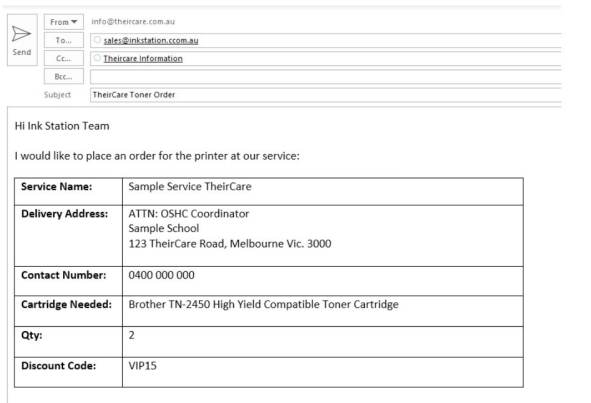
- The rest of the email should contain the following:
- Service Name
- Delivery Address
- Contact Name/Number
- Cartridge required - you must mention that it has to be the compatible cartridge.
- Quantity Required - this must not be any more than 2
- Discount Code is VIP15
Example:
Inkstation will process the order and send the ink directly to the service.
The invoice will be sent to the Finance Team for processing.
Was this article helpful?
That’s Great!
Thank you for your feedback
Sorry! We couldn't be helpful
Thank you for your feedback
Feedback sent
We appreciate your effort and will try to fix the article